





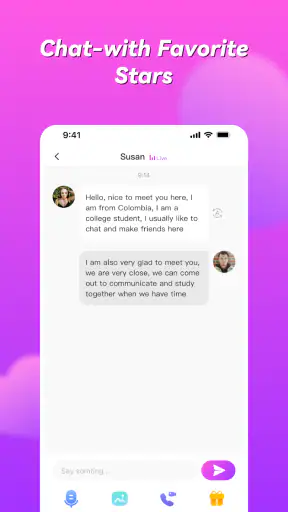

I approached Honeycam Pro-Live Video Chat as a social app for people who want more immediate contact than text messaging usually provides. Its central idea is simple: live video calls and chat with people beyond your usual circle. In practice, though, the experience depends heavily on how comfortably you handle camera-based conversations, how carefully you manage unexpected interactions, and whether your phone and connection are ready for live communication.
Honeycam is free to install, and the developer behind it is Honeycam Team. It is aimed at mature users, with a Mature 17+ content rating, so I would not treat it as a casual app for younger family members. The app has attracted over a million installs, yet its average rating sits at 3.1 from around one and a half thousand ratings. That combination tells me it has clear appeal, but also that the experience may be uneven from person to person.
My overall impression is that Honeycam makes the most sense when you want spontaneous social contact and are willing to spend a little time learning its rhythm. It is less convincing if you want a tightly controlled messaging tool, a quiet way to keep up with close friends, or a service where every interaction feels predictable. The most useful way to judge it is not by the promise of live video alone, but by how well it fits your habits and boundaries.
Getting past the first points of friction
Why the first conversation can feel less straightforward than expected
The biggest adjustment is moving from ordinary chat to a live format. With a text messenger, I can write, pause, edit, and decide when to answer. A video conversation removes much of that distance. The camera, microphone, timing, and other person all become part of the same moment. If I open Honeycam expecting the calm control of a standard messenger, the first session can feel more demanding.
That does not mean the app is difficult by design. It means the social pressure is different. A user may hesitate because the camera is active, because the other person responds quickly, or because the conversation does not immediately find a natural direction. I found it helpful to begin with a short session rather than treating the first call as a commitment to a long conversation.
Another common sticking point is deciding what kind of interaction you actually want. Honeycam is presented as a place for live video calling and chatting with friends worldwide, but those words can cover several different expectations. Someone looking for existing friends may approach it as a communication tool, while someone else may be more interested in meeting unfamiliar people. Those are very different experiences, and the app will feel more satisfying when your expectations are clear before you start.
I also recommend checking the screen carefully before responding to anything unfamiliar. Live social apps reward quick reactions, but speed is not always an advantage. If a profile, conversation, or request feels uncomfortable, I would rather leave it alone than continue simply because the interaction has already begun. The best first habit is to stay in control of the conversation instead of letting the live format set the pace for you.
What to check before blaming the app
Video chat exposes problems that text apps can hide. A weak connection may appear as delayed messages in one app, but in a live call it can become frozen video, broken audio, or an awkward pause. Before deciding that Honeycam is malfunctioning, I check whether other online services are behaving normally, whether I am moving between Wi-Fi and mobile data, and whether another person or device is using the same connection heavily.
Phone preparation matters too. I close demanding apps, make sure the device is not already hot, and avoid starting a call when the battery is nearly empty. Live video can be more sensitive to heat and power limits than ordinary browsing. If the phone is struggling generally, changing apps may not solve the underlying problem.
The camera and microphone deserve a quick practical check. I make sure the camera lens is clean, the microphone is not covered, and the phone is positioned somewhere with enough light. A dark room can make a video conversation look poor even when the application is working correctly. Similarly, a case, hand, or nearby noise source can make the other person think the call has an audio problem.
I would also keep the app updated through the normal app store process. The current version is 2.31.0, and using an older build can create avoidable compatibility issues. Honeycam supports Android 6.0 and later, which covers many devices, but support for an operating system does not guarantee the same performance on every phone. Older hardware may handle a live camera session less smoothly than a recent device.
A setup routine that saves time
My preferred setup is deliberately boring. I first choose a stable place to sit, then check lighting, sound, and network strength before opening a conversation. I keep the phone at a comfortable angle rather than holding it at arm’s length, because that reduces movement and makes the call easier to follow. These small choices make a bigger difference than changing between several apps in search of a perfect connection.
I also decide in advance what I am comfortable sharing. A live camera can reveal more than a profile picture: the room behind you, nearby documents, family members, work details, or your daily routine. I position myself with that in mind. This is especially important in a social app aimed at worldwide conversations, where people may have different expectations about privacy and personal boundaries.
Notifications are worth handling thoughtfully. If I am expecting a call, I keep the phone available, but I do not want unrelated alerts interrupting a conversation or exposing private previews on screen. The exact controls depend on the phone, so I use the device’s own notification settings rather than assuming the app will organize everything for me.
Because Honeycam is free to download but includes in-app purchases ranging from $0.99 to $199.99 per item, I would review purchase controls before spending time in the app. This is not a reason to avoid it, but it is a reason to be deliberate. A free installation does not mean every optional action inside a social app will be free. I prefer to understand the payment path first, especially if the phone is shared or connected to a family payment account.
Recovering when a call or chat goes wrong
When a conversation breaks up, I use a simple recovery sequence instead of repeatedly tapping the same control. I first wait briefly to see whether the connection catches up. If the problem continues, I leave the session normally, check the connection, and reopen the app. Repeatedly starting and ending calls in rapid succession can make it harder to tell whether the issue is temporary network congestion or a genuine app problem.
If the video fails but chat remains usable, I treat that as useful information. It suggests the phone may still be connected while the live media portion is struggling. In that situation, I continue with text only if the conversation is worth saving, then try video again later. This is more practical than abandoning the entire interaction immediately.
Audio problems need a different approach. I check whether the phone is connected to wireless headphones or another Bluetooth device, because sound may be routed somewhere unexpected. I also move away from loud appliances and crowded rooms. If the other person can see me but cannot hear me, I avoid assuming that the camera and microphone have failed together; the sound path may be the only part that needs attention.
For a frozen image, I look at the network before restarting the phone. Moving closer to the router, switching to a more reliable connection, or pausing other high-bandwidth activity can help. If every other online service is also slow, the app may simply be reflecting a broader connection problem. That distinction prevents a lot of unnecessary reinstalling.
Reinstalling should be a later step, not the first response. It can remove local problems, but it may also interrupt a workflow and require you to configure the app again. I would only consider it after closing the app, restarting the device, checking the connection, and confirming that the problem is repeatable. If the issue appears only with one contact, that points more toward the particular session or connection than toward the whole application.
When the app is not really the cause
Live conversation quality is shared between several factors: the app, the phone, the network, the environment, and the person on the other end. That makes diagnosis less obvious than it is with a notes app or a simple game. For example, delayed responses may come from distance between users, network routing, or someone using a busy mobile connection. A pause does not automatically mean the application has stopped working.
Lighting is another easy culprit. If the image looks grainy or dark, I first improve the room rather than expecting software to create detail that the camera never captured. Facing a window can help, although I avoid putting the brightest light directly behind me. A stable phone position also makes the picture feel clearer because the viewer is not dealing with constant movement.
Background noise can make a conversation feel broken even when the connection is fine. Fans, traffic, television, and several people speaking at once can overwhelm a phone microphone. I find that moving to a quieter room and speaking a little closer to the device is often more effective than restarting anything.
There is also a human cause that no technical fix can solve: an unproductive or uncomfortable conversation. Honeycam can connect people, but it cannot guarantee that every exchange will be friendly, interesting, or respectful. If someone pressures me to reveal personal information, move the conversation somewhere else, send money, or continue after I have said no, I end the interaction. I do not try to repair that kind of problem through better settings.
The Mature 17+ rating is an important part of this judgment. Parents should not rely on the fact that the app is free or popular to decide whether it is suitable for a younger user. I would consider the rating, the live nature of the service, and the possibility of unpredictable conversations together. For adults, the same point becomes a reminder to use ordinary online safety habits: avoid sharing identifying details, be cautious with requests, and leave conversations that cross a boundary.
How Honeycam compares with familiar alternatives
Compared with a conventional messenger, Honeycam feels more immediate and less organized around people I already know. A standard messaging app is usually better when I need reliable contact with family, workmates, or a small group of close friends. It tends to offer a clearer history and a more deliberate pace. Honeycam is more appealing when the value comes from live discovery and spontaneous conversation rather than keeping a neat record of ongoing discussions.
Compared with a traditional social network, the focus here is closer to direct interaction than to browsing a long feed. I do not open it for the same reason I would open an app built around posts, comments, or passive scrolling. The live format can create a stronger sense of presence, but it also asks more from me. I need to be available in the moment instead of casually checking updates.
Compared with dedicated video meeting tools, Honeycam is not the first choice for structured calls. If I need a planned group discussion, a work presentation, or a predictable meeting with known participants, I would choose a service designed around scheduling and organized sessions. Honeycam’s appeal is the social side of live contact, not formal coordination.
That trade-off explains the mixed impression I get from its rating. A person who enjoys quick, informal conversations may find the format engaging, while someone who expects polished reliability and strict control may become frustrated. Neither reaction is unreasonable. The app is asking users to accept more uncertainty in exchange for a more open-ended social experience.
Who will get the most from it
I think Honeycam suits adults who enjoy meeting people through conversation rather than typing long introductions. It can work for someone who is tired of passive feeds and wants a more direct social moment, provided that person is comfortable ending conversations quickly when the match is poor. It may also appeal to users who want to maintain a casual international social routine without treating every interaction as a serious friendship.
A realistic everyday use case would be a short evening session after work. I might have twenty minutes, a quiet room, and enough energy for a conversation but not enough interest in scrolling through posts. I would open the app, check the camera position, start with a brief exchange, and leave if the interaction feels forced. Used this way, the app is a lightweight social activity rather than a replacement for my main communication tools.
I would skip it if I dislike appearing on camera, need a carefully managed contact list, or want conversations that can be answered hours later without social pressure. I would also choose another option if I am looking for dependable calls with people I already know. Honeycam’s wider social character is precisely what makes it interesting for some users and unsuitable for others.
People who are particularly sensitive to unexpected content or unsolicited approaches should be cautious. The Mature 17+ classification is not a minor label to ignore; it should shape how you use the app and whether you use it at all. I would not recommend handing it to a child simply because the download itself costs nothing.
My practical verdict after weighing the trade-offs
Honeycam Pro-Live Video Chat is a focused social app with a clear strength: it puts live conversation at the center instead of making video an occasional extra. I like that it can turn a spare moment into a direct human exchange, and I can see why the service has passed the million-install mark. At the same time, the live format brings friction that a store summary cannot show: connection sensitivity, camera anxiety, uneven conversations, and the need for stronger personal boundaries.
The free entry point makes trying it easy, but I would not rush into optional purchases. I would first test whether the style of interaction suits me, whether calls remain comfortable on my device, and whether I enjoy the people I meet. The current version is 2.31.0, and the app runs on Android 6.0 or later, but those technical details matter less than the quality of the connection and the way I choose to use the service.
My recommendation is conditional but positive for the right adult user. Start with short sessions, prepare the phone and room, keep personal information private, and treat connection failures methodically rather than emotionally. If you want spontaneous video-based social contact, Honeycam is worth exploring. If you want a dependable private messenger or a structured meeting platform, I would choose a more specialized alternative instead.
In the end, I see Honeycam as an app that rewards curiosity but punishes careless expectations. Its best moments come when the conversation feels natural and the technology stays out of the way. Its weakest moments appear when a user expects the control of ordinary messaging or assumes every problem is caused by the app. Try it as a flexible social experiment, not as your only communication tool, and its strengths become much easier to appreciate.


